Featured image of post 【从零开始的博客生活 - 3】Hugo&Stack用户此生必做的自定义修改

【从零开始的博客生活 - 3】Hugo&Stack用户此生必做的自定义修改

调整茫茫多的细节,优化功能和样式

很好,少年,选择了Hugo和Stack主题,你就成功了一半。而行百里者半九十,剩下的就是不断的调整细节,优化功能和样式。这里给出了一份我认为的最佳实践,跟着做,你就成功了。

1. 行内公式 $...$ 格式与默认数学渲染

Stack 主题的数学公式渲染基于 Hugo 的 Goldmark passthrough 机制。默认配置:

  • 支持块级公式:\[...\]$$...$$
  • 支持行内公式:\(...\)
  • 默认每篇文章需在 front matter 中手动添加 math: true 才能渲染公式

$E = mc^2$ 这种单美元符号写法是 LaTeX 社区最普遍的行内公式格式。更重要的是它只有一个符号输入更快捷。

修改 hugo.toml以支持单美元符号写法:

1
2
3
4
5
6
[markup.goldmark.extensions.passthrough.delimiters]
    block  = [["\\[", "\\]"], ["$$", "$$"]]
    inline = [["\\(", "\\)"], ["$", "$"]]

[params.article]
    math = true

调整后三种行内公式写法都能正确渲染:

写法示例渲染效果
\(...\)\(E = mc^2\)\(E = mc^2\)
$...$$E = mc^2$$E = mc^2$
\[...\]\[E = mc^2\]\[E = mc^2\]
$$...$$$$E = mc^2$$$$E = mc^2$$

同时我们通过params.article给所有文章默认开启了数学渲染。如果某篇文章不需要,可以单独关闭(不会有人这么无聊吧):

1
2
3
4
---
title: "纯文本文章"
math: false
---
⚠️ 警告
  • 单美元符号可能误匹配普通文本中的货币符号(如"售价 $5")。技术博客中这个问题很少出现
  • 开启后所有页面都会加载 KaTeX 资源(CSS + JS),对纯文本文章有非常非常轻微性能影响

2. 精简页脚版权行

Stack 主题默认页脚太单调,必须改一改。

这涉及到修改主题的footer模板。但是我们无论何时都尽可能不去动./theme/下的文件,而是利用 Hugo 的机制进行覆盖。

Hugo 的模板查找顺序是项目目录优先于主题目录,直接创建 layouts/_partials/footer/footer.html

 1
 2
 3
 4
 5
 6
 7
 8
 9
10
11
12
13
{{- $ThemeVersion := "4.0.0" -}}
<footer class="site-footer">
    <section class="copyright">
        &copy;
        {{ if and (.Site.Params.footer.since) (ne .Site.Params.footer.since (int (now.Format "2006"))) }}
            {{ .Site.Params.footer.since }} -
        {{ end }}
        {{ now.Format "2006" }} {{ default .Site.Title .Site.Copyright }} - Powered by
        <a href="https://gohugo.io/" target="_blank" rel="noopener"><b>Hugo</b></a> &amp;
        <a href="https://github.com/CaiJimmy/hugo-theme-stack" target="_blank" rel="noopener" data-version="{{ $ThemeVersion }}"><b>Stack</b></a>
    </section>
    ...
</footer>

调整后效果:

© 2026 日常 - Powered by Hugo & Stack

3. 访客统计与 ICP 备案

Stack 主题默认没有站点访客统计功能,也没有国内网站常见的 ICP 备案号展示位置。

1. 修改页脚模板 layouts/_partials/footer/footer.html

 1
 2
 3
 4
 5
 6
 7
 8
 9
10
11
12
13
14
15
16
{{- $ThemeVersion := "4.0.0" -}}
<footer class="site-footer">
    ...

    <section class="powerby">
        <span id="busuanzi_container_site_uv" style="display:none">
            Waiting for No.<span id="busuanzi_value_site_uv"></span>
        </span>
        {{ with .Site.Params.footer.icp }}
            <br/>
            <a href="https://beian.miit.gov.cn" target="_blank" rel="noopener" class="footer-icp">{{ . }}</a>
        {{ end }}
    </section>
</footer>

<script async src="//busuanzi.ibruce.info/busuanzi/2.3/busuanzi.pure.mini.js"></script>

2. 添加配置hugo.toml 中:

1
2
3
[params.footer]
    since = 2026
    icp = "粤ICP备xxxxxxxx号-1"

3. 添加 ICP 样式assets/scss/custom.scss 中:

 1
 2
 3
 4
 5
 6
 7
 8
 9
10
11
.footer-icp {
    color: var(--body-text-color);
    opacity: 0.5;
    font-size: 1.1rem;
    text-decoration: none;
    font-weight: normal;
}

.footer-icp:hover {
    text-decoration: none;
}

调整后效果

  • 页脚显示访客统计(不蒜子服务,脚本加载成功后自动显示)
  • 显示 ICP 备案号,小号灰色字体,不喧宾夺主
💡 提示

不蒜子是第三方免费服务,几乎是统计访问量的最简单解决方案,很推荐。

4. 禁用目录列表自动编号

Hugo 的 markup.tableOfContents 默认使用有序列表 <ol>,浏览器会自动给目录项添加编号。

如果文章标题本身带有编号(如 “1. 引言”),目录就会产生重复编号:

1
2
3
1. 1. 引言
    1.1 1.1 背景
2. 2. 正文

我们修改 hugo.toml,将ordered设置为false:

1
2
3
4
[markup.tableOfContents]
    endLevel   = 4
    ordered    = false
    startLevel = 2

调整后目录变为无序列表,干净地显示 “1. 引言” 而非 “1. 1. 引言”。

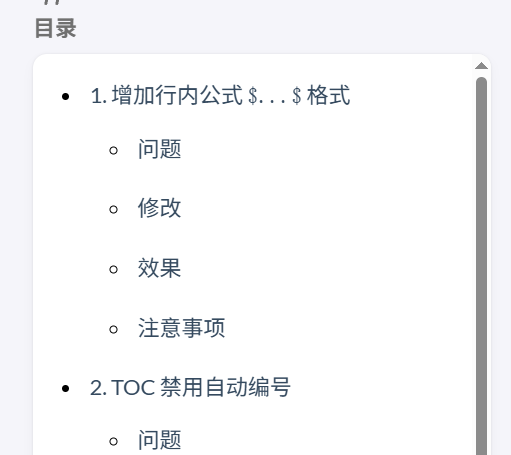
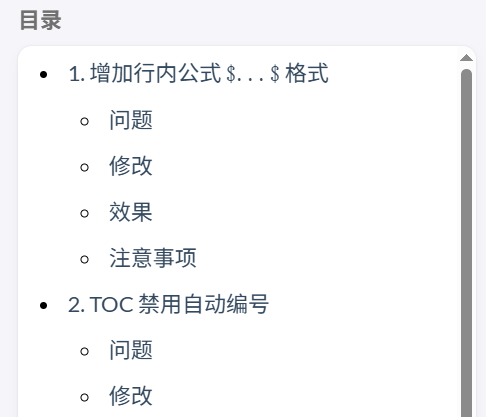
5. 调整目录行间距

目录项的默认行间距较大。目录过长时会占用过多垂直空间,视觉不够紧凑。

assets/scss/custom.scss 中添加:

1
2
3
4
.toc-nav li {
    margin-top: var(--spacing-xs) !important;
    margin-bottom: var(--spacing-xs) !important;
}

目录行间距变小,更加紧凑,显示更多内容。

调整前调整后
调整前调整后

6. 调整代码块样式

代码块样式存在两个问题:

  1. 代码块有上下内边距,导致代码区域显得过于宽松
  2. 代码块缺乏边框,与正文区分不够明显

我们在 assets/scss/custom.scss 中添加:

 1
 2
 3
 4
 5
 6
 7
 8
 9
10
/* 代码块:取消上下padding,增加浅灰边框 */
.article-content .highlight {
    padding: 0 var(--card-padding);
    border: solid 2px #eeeeee;
}

/* 复制代码按钮同步调整位置,上偏移设为0 */
.copyCodeButton {
    top: 0 !important;
}

调整后

  • 代码块上下内边距归零,更加紧凑
  • 浅灰边框(#eeeeee)使代码块与正文有清晰的视觉分隔

7. 样式微调

正文和页面有以下问题

  1. 1.5em 的间距过大,显得松散
  2. 各处硬编码,无法统一调整
  3. 引用块字号与正文相同,缺乏层次感
  4. 菜单图标与文字之间存在过大的间距
  5. 分割线默认100px,大多数情况下过短

这些复杂样式问题涉及静态 CSS动态配置的结合。首先核心原理:

  1. Hugo 模板的变量注入:SCSS 文件不会被 Hugo 当作模板执行,无法直接使用 .Site.Params 读取配置。因此需要在 HTML 模板中通过 <style> 标签注入 CSS 变量。

  2. 文件作用

    • layouts/_partials/head/custom.html:Hugo 会在每个页面头部引入此模板。我们在这里注入 CSS 变量,读取 hugo.toml 中的 paraSpacing 参数。这里实际上具有一般html元素的地位,因此是个可以进行任何注入(js,css,css变量,DOM节点)的操作点位。
    • assets/scss/custom.scss:传统的样式覆盖文件,使用 CSS 变量而非硬编码值。
  3. 工作流程

    1
    2
    3
    4
    5
    
    hugo.toml 参数 
    layouts/_partials/head/custom.html 注入 CSS 变量
    assets/scss/custom.scss 使用变量覆盖主题样式
    

调整方案

可以看到主题中多个元素的纵向 margin 硬编码为 1.5em

  • article-content > p(正文段落)
  • article-content blockquote(引用块)
  • article-content .gallery(图片画廊)
  • article-content table(表格)

我们将这些改为引用 hugo.toml 中的 paraSpacing 参数:

1
2
[params]
    paraSpacing = "1em"

创建变量注入模板,这一步很关键,我们实际上是在向最终html页面直接注入代码。新建 layouts/_partials/head/custom.html

1
2
3
4
5
6
7
<style>
    :root {
        --para-spacing: {{ .Site.Params.paraSpacing | default "1em" }};
        --quote-font-size: 0.875em;
        --menu-icon-separation: 15px;
    }
</style>

这个文件会被主题自动引入到每个页面的 <head> 中,将 Hugo 配置转换为 CSS 变量。

变量说明

  • --para-spacing:控制段落、引用块等元素的纵向间距
  • --quote-font-size:控制引用块字号(默认 0.875em,比正文略小)
  • --menu-icon-separation:控制侧边栏菜单图标与文字的间距(主题默认 40px,改为 15px 更紧凑)

然后使用变量覆盖样式,在 assets/scss/custom.scss 中:

 1
 2
 3
 4
 5
 6
 7
 8
 9
10
11
12
13
14
15
16
17
18
19
20
21
22
23
24
25
26
27
28
29
30
31
/* 注意:CSS变量 --para-spacing 和 --quote-font-size 在 layouts/_partials/head/custom.html 中定义 */

/* 正文段落间距 */
.article-content > p {
    margin-top: var(--para-spacing) !important;
    margin-bottom: var(--para-spacing) !important;
}

/* 引用块:间距+字号 */
.article-content blockquote {
    margin-top: var(--para-spacing) !important;
    margin-bottom: var(--para-spacing) !important;
    font-size: var(--quote-font-size);
}

/* 画廊间距 */
.article-content .gallery {
    margin-top: var(--para-spacing) !important;
    margin-bottom: var(--para-spacing) !important;
}

/* 表格间距 */
.article-content table {
    margin-top: var(--para-spacing) !important;
    margin-bottom: var(--para-spacing) !important;
}

/* 分割线宽度 */
.article-content hr {
    width: 70%;
}

调整后效果:

  • 四处元素的纵向 margin 统一由 paraSpacing 参数控制,默认 1em,视觉更紧凑
  • 引用块字号缩小为 0.875em,与正文形成层次对比
  • 侧边栏菜单图标与文字间距从默认 40px 减小到 15px,更加紧凑
  • 后续如需调整间距,只需修改 hugo.toml 中一个参数,无需改动多处 CSS
  • 分割线宽度调整为 70%,相比于默认的 100px 更加适中

8. 修改文章模板 frontmatter 格式

hugo new content 命令使用 archetypes/default.md 作为模板创建新文章。Stack 主题默认生成的 frontmatter 使用 TOML 格式:

1
2
3
4
5
+++
date = '2026-04-11T12:00:00+08:00'
draft = true
title = 'My New Post'
+++

存在的问题

  1. TOML 格式使用 +++ 分隔符,与社区更常用的 YAML 格式(---)不一致
  2. draft = true 导致每篇新文章默认都是草稿状态,需要手动改为 false 才会发布

修改 archetypes/default.md

1
2
3
4
5
---
date: '{{ .Date }}'
draft: false
title: '{{ replace .File.ContentBaseName "-" " " | title }}'
---

调整后新创建的文章使用 YAML 格式,且默认不是草稿:

1
2
3
4
5
---
date: '2026-04-11T12:00:00+08:00'
draft: false
title: 'My New Post'
---

修改文件汇总

文件路径修改内容
hugo.toml增加 $...$ 行内公式、禁用目录编号、全局开启数学渲染、添加 paraSpacing 参数和 ICP 备案号配置
archetypes/default.mdfrontmatter 格式改为 YAML,draft 默认 false
layouts/_partials/footer/footer.html精简页脚版权信息,添加不蒜子访客统计和 ICP 备案号展示
layouts/_partials/head/custom.html新建,注入 CSS 变量 --para-spacing--quote-font-size
assets/scss/custom.scss添加 ICP 样式、目录行间距、代码块样式(边框+复制按钮位置)、段落/元素间距、引用块字号的覆盖样式